
Risk-based testing: check your scores against escaped defects
Take a QA lead whose team uses risk-based testing to plan each sprint. Every story gets a risk score, the team tests the high scorers first, and the low scorers…
You have read this

A visual test compares a screen with an image the team has already accepted, called the visual baseline. The test can show a change, but a reviewer still needs to check whether the new screen meets the agreed rule.
On September 22, Applitools announced tools that let coding agents inspect visual differences and resolve baselines. An agent is an AI tool that can carry out steps through connected tools. The announcement describes a useful way to investigate a changed screen. It also raises a review question: what should the reviewer check before the agent replaces the saved image?
Take a subscription screen with a Confirm button. The agreed rule says the charge for each month must appear beside that button. A customer should be able to see the charge before they confirm. In this exercise, the new screen has lost the charge label.
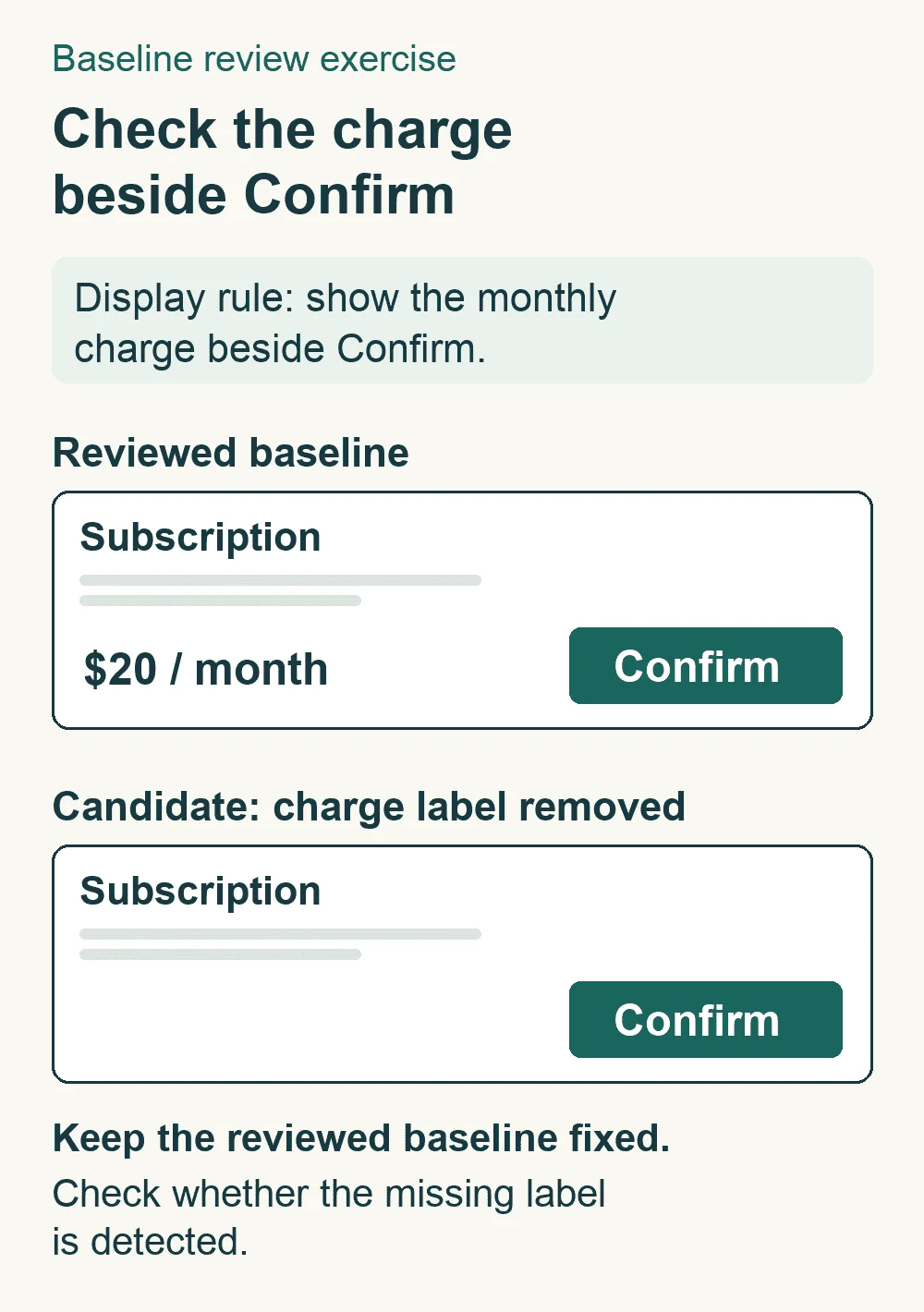
Keep the reviewed image and the display rule open together. The old image shows the charge; the new image does not. A visual change gives the reviewer a place to look. The rule explains why the screen needs a fix.
The team could accept the new screen as its baseline. If the same screen appears in a later run, its missing label would then match the saved reference. The screen would still break the rule. Changing the saved image has changed what the test can detect.
This is a risk to check in your review process. It is not evidence that the announced Applitools tools have approved such a defect.
Give a named reviewer the new image, the old baseline and the version of the rule used for the test. Ask them to explain each accepted change by pointing to what the screen should show. A moved button may follow an approved design change. A lost charge label needs a correction unless the rule itself has changed and received review.
An agent can help gather the images and locate the changed region. The reviewer still needs enough evidence to decide whether that change belongs in the product. Record why the change was accepted beside the baseline version. That leaves the next reviewer a decision they can inspect.
For a team that wants to practise these reviews, contact Nopmark about your training needs. Use a screen and a rule from your own product to define the skill the team needs to develop.
Before adopting the process, try it with 2 candidates: the intended screen and a copy with the charge label removed. Keep the reviewed baseline fixed while checking both. Use the same browser, screen size, data and capture settings so other changes do not hide the missing label.
For the correct screen, check whether the test reports a change you cannot explain. For the faulty copy, look for a reported difference at the missing label. Record the image and the tool result together. The faulty copy must remain rejected while the rule still requires that label.
If the missing label produces no reported difference, investigate the capture and comparison settings. Check whether the area was left out or the wrong baseline was used. The screenshot may also show the wrong state. You need evidence before naming any of these as the cause. Do not treat a silent comparison as evidence that the screen meets the rule.
This exercise checks a known defect in one screen. It does not show how well the tool will detect other kinds of defects.
Keep the version of the rule, the old and new images, and the test result in the same record. Include the reviewer and their reason for accepting or rejecting the change. Save the known-defect check with its settings so another tester can repeat it.
After the label is restored, check the fixed screen against the reviewed baseline again. If a new baseline is still needed, review that exact image before you accept it. The next person should be able to see which change to the product led to the new baseline.
Tim Hinds, Applitools announcement, September 22, 2026. The feature description is vendor evidence; the subscription exercise and review process above are proposed teaching.
Take a QA lead whose team uses risk-based testing to plan each sprint. Every story gets a risk score, the team tests the high scorers first, and the low scorers…
You have read this