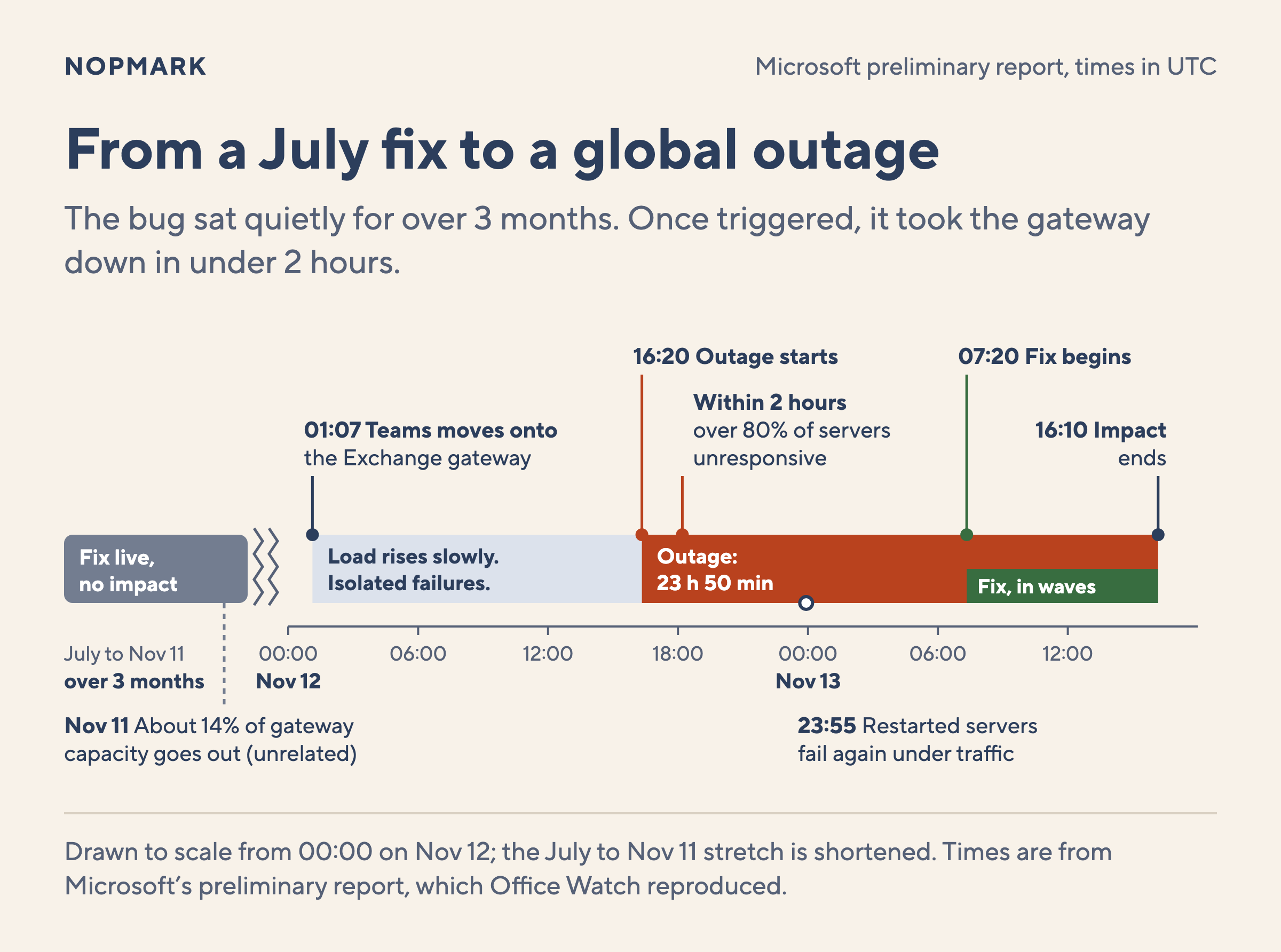
At 01:07 UTC on November 12, an automated system moved Teams traffic onto servers that also handle Exchange Online email. Microsoft says this kind of failover "is part of normal operations". Over the next 15 hours, the load on those servers rose slowly. Then, during the peak hours of US traffic, they began to stop responding. In under two hours, more than 80% of them were down. By Microsoft's count, the Microsoft 365 outage that followed lasted just under 24 hours.
The bug behind it had been on those servers since July. It passed Microsoft's load testing, and then it ran worldwide for more than 3 months with no impact. The load tests and the 3 months in production both passed because neither one ran under the conditions of November 12.
The facts here come from Microsoft's preliminary Post-Incident Report (PIR), dated November 15. The report itself sits behind the Microsoft 365 admin login, but Office Watch published the full text. Charles Lamanna, a Microsoft executive vice president, posted a shorter version on X. The Register reports that the final report is due on November 20, so some details may still change.
TL;DR
A July fix for Microsoft's gateway servers had a lock contention bug that gets worse on machines with more cores.
The load test missed it because the lab used weaker hardware and a different traffic mix than production.
A Teams failover, missing capacity and US peak traffic triggered it on November 12. Failover then spread it to more than 80% of servers.
Exchange Online could not move to the second gateway, and restarted servers were swamped by waiting traffic.
The fixes for testers: test on production hardware with real traffic mixes, test conditions together, and test failover, recovery and rollback under load.
What broke in the Microsoft 365 outage?
To follow the story, you need one piece of Microsoft's setup. Before your Outlook app reaches your mailbox, it connects to a networking gateway. This is a large fleet of front door servers that accept connections for many Microsoft 365 services. Microsoft runs two of these gateways. Teams can move between them, and on November 12 it moved onto the one Exchange uses.
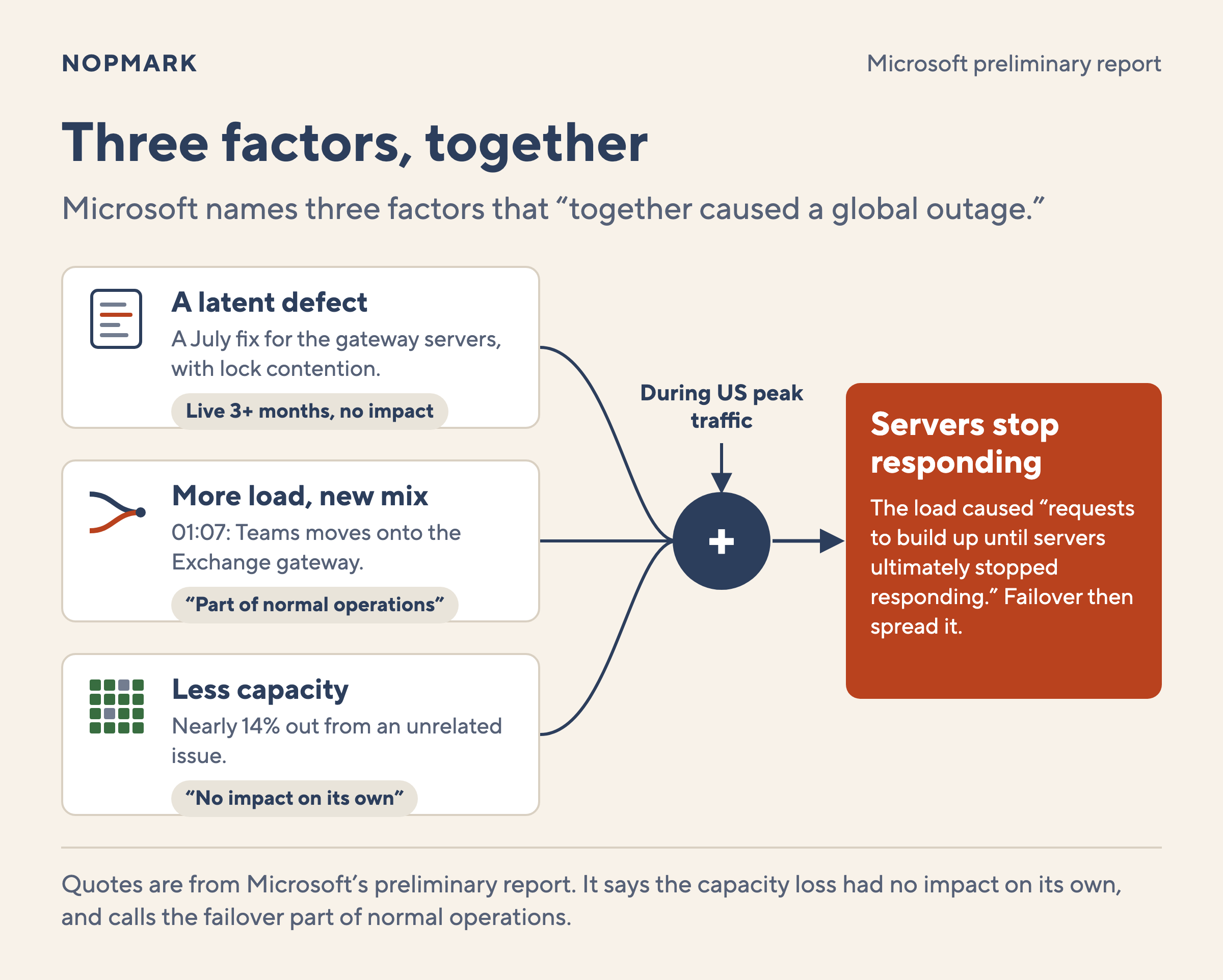
The report names "three main factors that together caused a global outage":
A latent defect: In July, Microsoft shipped a fix built only for the gateway servers. It contained a bug that made the servers "overwhelmed and unresponsive under certain load conditions". A latent defect is one that is present in the code but has not yet caused a failure.
More load, in a new shape: The Teams failover at 01:07 UTC "increased the load on the networking gateway and changed its traffic patterns".
Less capacity: Nearly 14% of the gateway's server capacity was already out of service from an unrelated issue the day before. Microsoft says this "had no impact on its own," because the service had spare capacity.
Microsoft does not say that any one factor caused the outage. It says that "taken together, the increased load and the reduced server capacity" made the gateway hit the bug from July. Then the failure began during the peak window of traffic in the United States.
Headlines such as WCCFTech's called this a Windows bug, because the defect was in "an internal Windows process". But the fix was made only for these gateway servers. The report says "neither the underlying defect nor the fix applies to broader Windows deployments". Your own Windows laptops and servers were not affected by it.
What lock contention does to a busy server
The report gives the bug a name: "lock contention inside an internal Windows process". It says this caused the machine's CPU and memory to be "exhausted". Microsoft has not named the process. Its timeline says the trouble was in "a process on the affected servers responsible for establishing connections".
If you have not met lock contention, here is the general idea. A program runs many threads at once, and each thread is a separate line of work. When threads share data, a lock lets only one thread change it at a time. The others wait their turn. Contention is what happens when many threads want the same lock at once. The waiting line grows, and the machine spends more of its effort on waiting and less on useful work.
A machine with more CPU cores can run more threads at the same moment. That usually means more speed. With a contended lock, it can also mean a longer line at the lock. That general picture fits what Microsoft says: the problem "is worsened on machines with more cores and newer hardware".
Lock contention is not the same as a deadlock, and Microsoft did not say deadlock. A deadlock is when threads wait on each other forever, so no work gets done. Contention still makes progress, just slower and slower as the load grows. The difference matters to a tester, because each one fails in a different way under test. A deadlock may hang at low load. Contention may look fine until the load gets high enough.
Why the load test passed
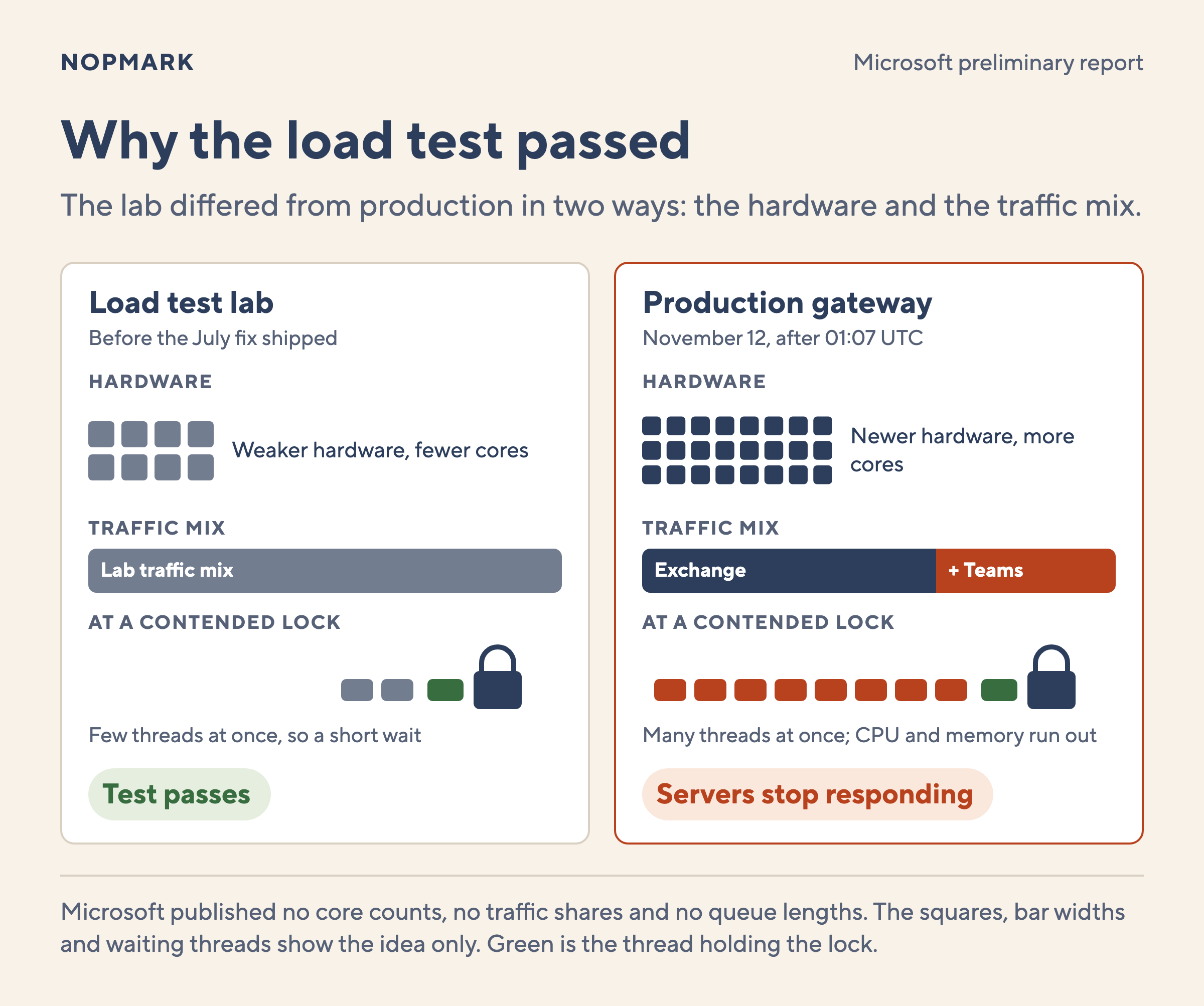
Before the July fix shipped, Microsoft had load tested it. The report explains why the test missed it: "the traffic mix and SKUs used in our labs" were different. A SKU here is a hardware model. The report goes on: "our load testing tended to focus on weaker hardware with fewer cores".
That sentence names two ways the lab differed from production:
The hardware: The lab used weaker machines with fewer cores. The production gateway runs newer machines with more cores, where the contention gets worse.
The traffic mix: The lab sent a different mix of requests. On November 12, the Teams failover changed the mix on the Exchange gateway. A load test can hit the right volume and still miss a bug that depends on what kind of requests arrive.
The ISTQB Performance Testing syllabus (2018) names this gap. It says system level performance testing should use hardware, software and data "representative of the production environment". It also warns that "concurrency issues are notoriously difficult to find and reproduce". This bug was a concurrency issue, tested on hardware that was not representative.
After the load test, the next safety layer was the rollout. Microsoft rolls out changes in stages, and this one "went through safe deployment and saturated globally over several weeks". Staged rollout is good practice, and it can catch bugs that testing misses. But a quiet rollout only shows the change did no harm under the conditions it met. The report gives no sign that, in those 3 months, the gateway met a Teams failover, missing capacity and US peak traffic at the same time.
How failover spread the failure
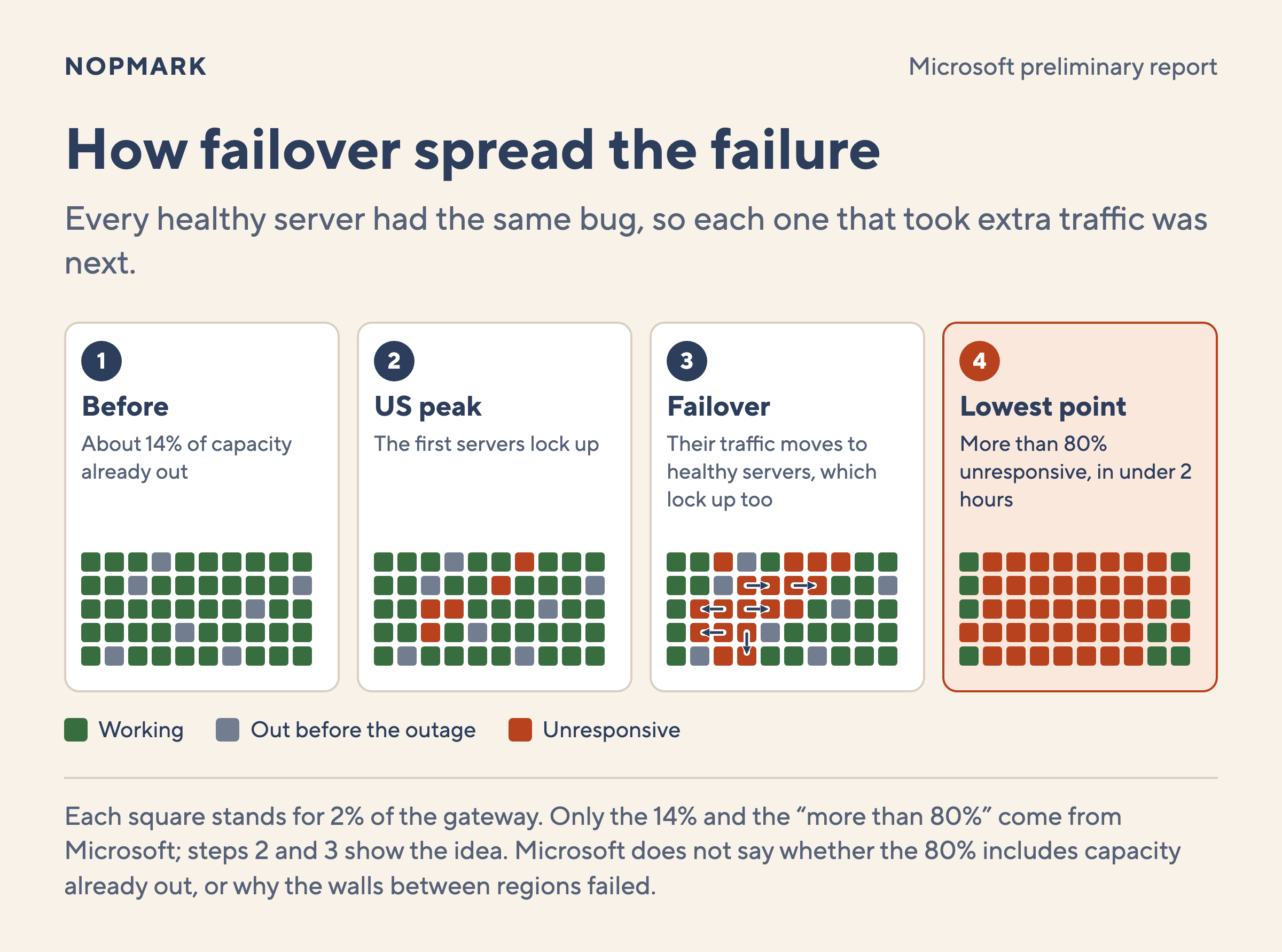
When the first servers stopped responding, Microsoft's traffic management did what it was built to do. It moved users to healthy servers. The report says this "happens often" and "is normally what makes the service resilient". On a normal day, it is the right move.
This time, every healthy server had the same latent bug. The report describes the result: "the same amount of load was spread across fewer servers". Each server that took on extra traffic was then more likely to hit the bug. In less than two hours, the failure had spread across the fleet. At the lowest point, more than 80% of servers were unresponsive.
The gateway is split into thousands of "capacity units," grouped into regions. Walls between those groups, which Microsoft calls bulkheads, should stop a failure in one region from reaching the others. They did not, "due to a separate issue". Microsoft has not yet said what that issue was.
Why email stayed down when Teams came back
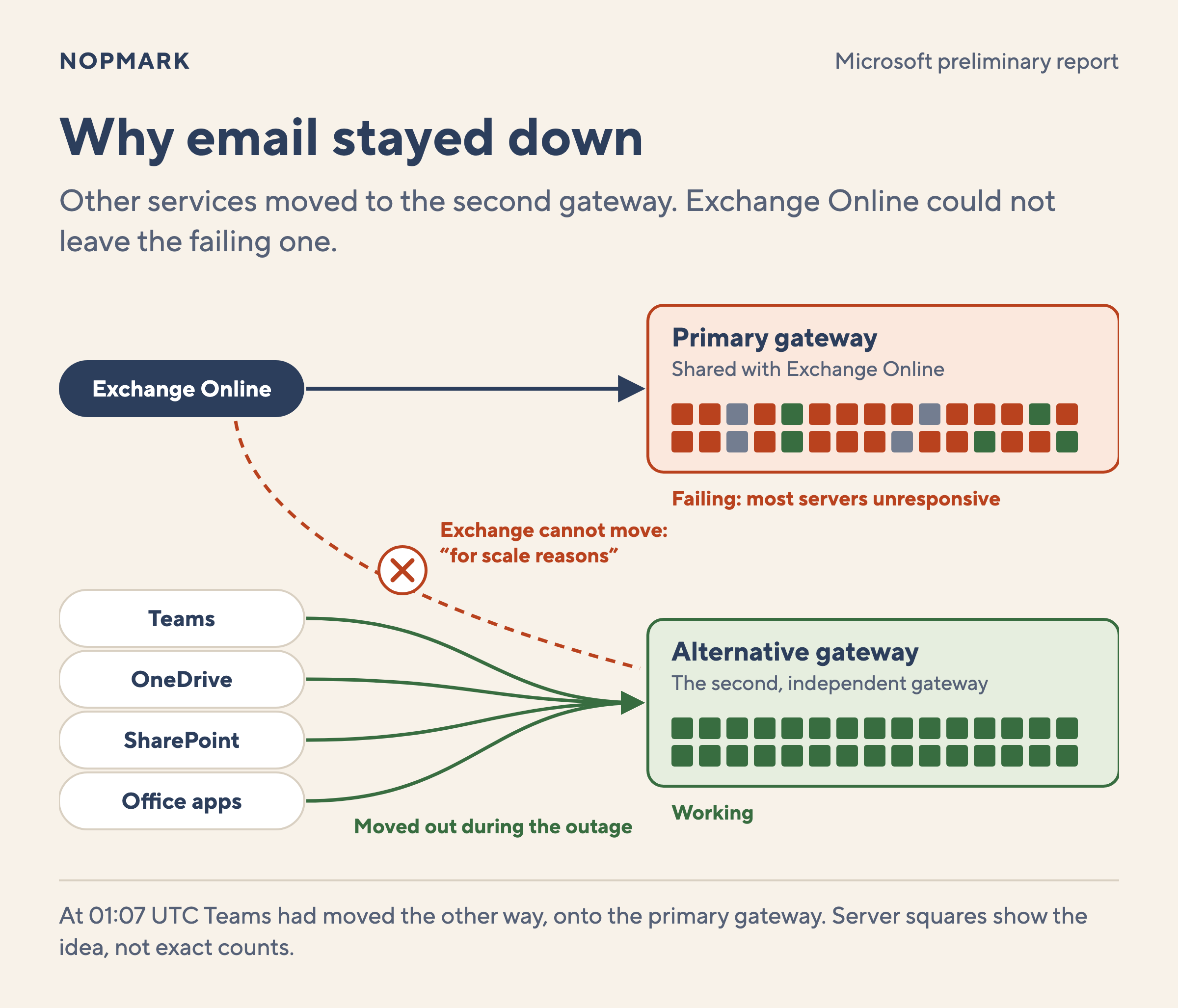
While the gateway failed, the services that could move did. The report says Teams, OneDrive, SharePoint and the Office apps "failed out of the faulty network gateway infrastructure". Teams chats and meetings worked "for most of the outage". Exchange Online could not leave. The report says it cannot fail out of this gateway "for scale reasons".
Microsoft 365 had two gateways, but Exchange Online could use only one of them, so email had no second path.
Why restarting the servers did not work
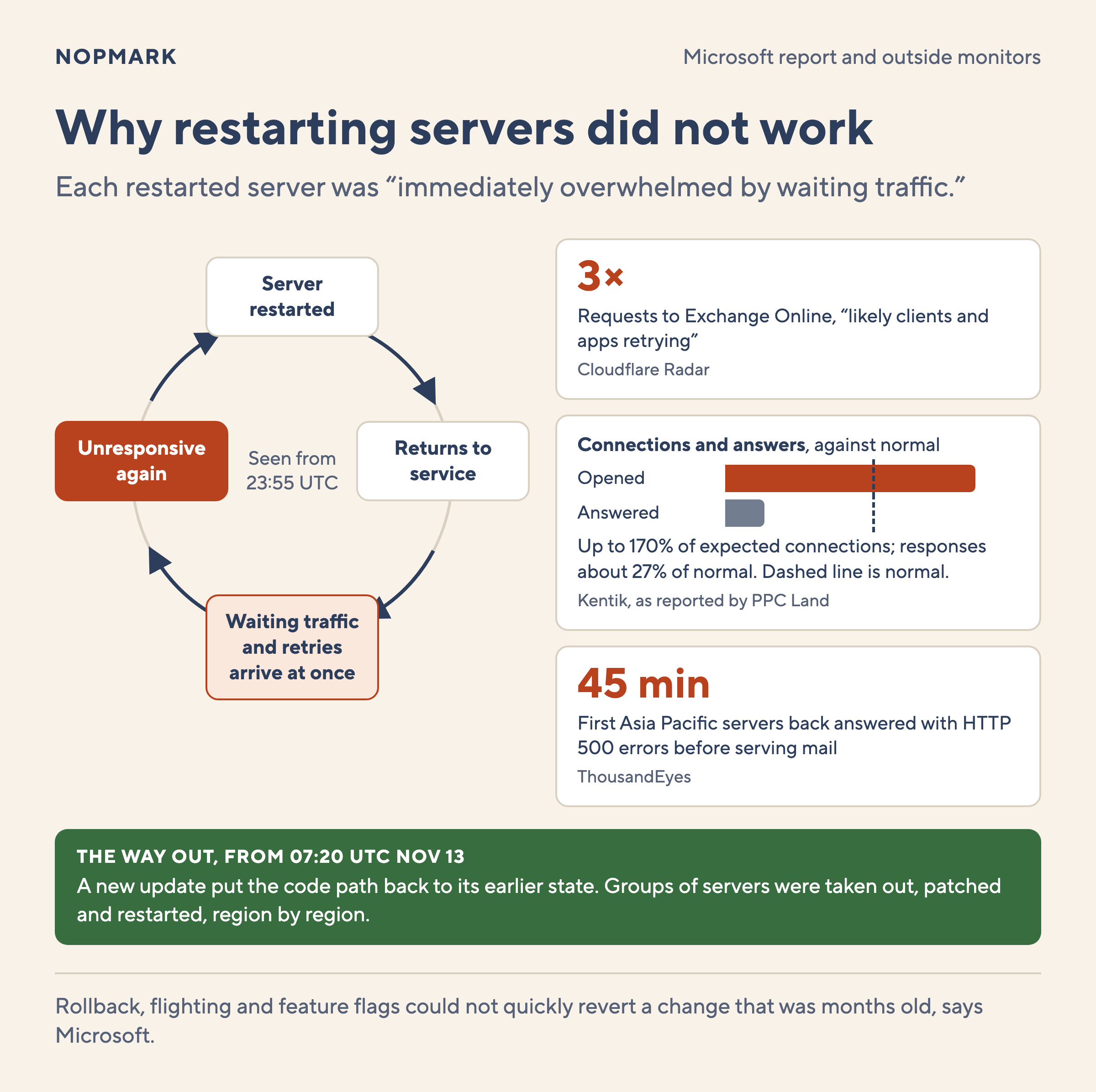
Through the night, engineers restarted servers on the failing gateway. The report says each server "returned to service" and was then "immediately overwhelmed by waiting traffic". At 23:55 UTC, Microsoft noted that returned servers stayed healthy until they received traffic, then became unresponsive again.
Outside monitoring firms saw that waiting traffic from the client side:
Cloudflare Radarsaw requests to Exchange Online triple, "likely clients and apps retrying". It also saw most Exchange responses come back as server errors until about midnight UTC.
Kentik reported that devices opened up to 70% more connections to Exchange than expected. Responses from Microsoft fell to about 27% of normal. These figures come from PPC Land's write-up of a Kentik chart.
ThousandEyessaw most connection attempts time out before a session could start. When the first servers in Asia Pacific came back, they returned HTTP 500 errors for about 45 minutes before they served mail.
Microsoft's own timeline points the same way. At 19:20 UTC, engineers found the load was "not driven by an overall increase in traffic". It came from "many servers being unexpectedly unavailable". Clients that cannot connect tend to try again, and those retries pile onto whichever servers are still up. The report says its "normally automated recovery processes were not designed to restore service from this broad unresponsive state".
Rolling back the July change was not simple either. Microsoft says its "normal rollback, flighting, and feature flags" could not quickly revert a change that was months old. Engineers wrote a new update that put the code back to its earlier state. They started applying it at 07:20 UTC on November 13, taking groups of servers out of service, patching them and restarting them. Microsoft declared the impact over at 16:10 UTC.
What I would test after this outage
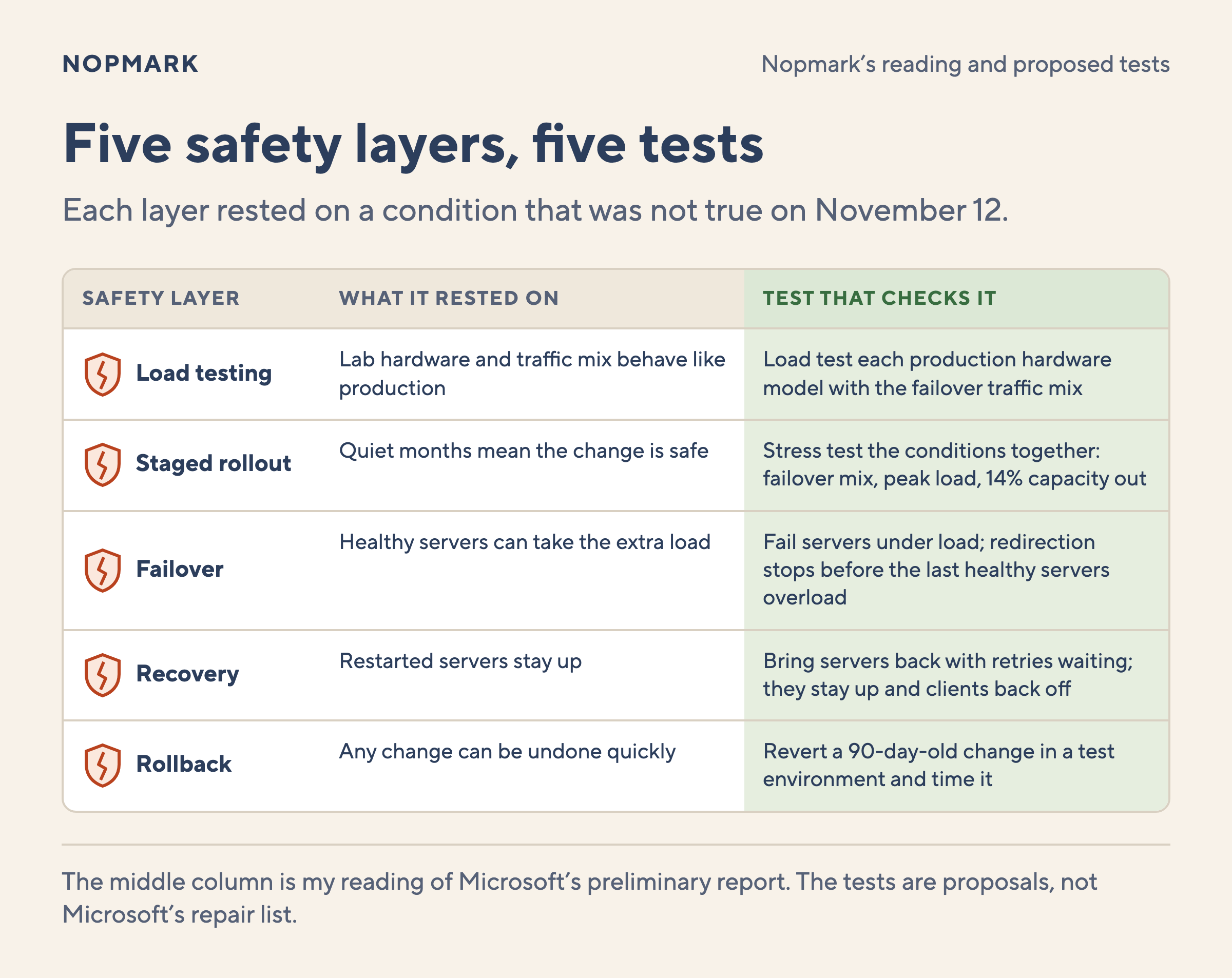
Every check in this story that passed had a reason to pass. These are the tests I would add if I owned a service built this way. They come from my reading of the report, not from Microsoft's repair list.
Load test on production hardware: Run the test on each hardware model in the production fleet, at full core count. Raise the number of concurrent requests in steps and record throughput at each step. Expected result: throughput rises and then levels off. If throughput falls as the load rises, you have found contention.
Build the traffic mix from production: The CT-PT syllabus calls a pattern of real usage an operational profile, and several of them combined a load profile. Take yours from production data, and include the mix you get after a failover. Expected result: the service stays within its response time and CPU limits under the failover mix.
Test the conditions together: The syllabus says stress testing also checks "reduced availability of resources such as accessible computing capacity". Run the failover mix at peak load with 14% of capacity removed. Testing each condition alone could pass while the combination fails.
Test the failover against a load-triggered fault: Make a share of servers fail under load and watch what the traffic redirection does. Expected result: the redirection stops before it overloads the last healthy servers.
Test recovery with traffic waiting: Take the service fully down and let clients retry for a while. Then bring servers back in stages. Expected result: returned servers stay up, and clients back off instead of retrying at once.
Test the rollback on an old change: Pick a change from 90 days ago and try to revert it in a test environment. Expected result: you can revert it in a known time. If you cannot, plan how you would fix forward.
Each of these tests asks whether a safety layer still works under the conditions that broke it on November 12. The ISTQB syllabus already names most of them: load, stress, scalability and concurrency testing, run in an environment representative of production.
Where Nopmark fits
Most testers never load test a global email gateway, but every tester decides what a test environment leaves out. The ISTQB Foundation Level (CTFL) course covers non-functional test types such as performance and reliability. The performance testing ideas in this post build on that foundation.
FAQ
What caused the Microsoft 365 outage on November 12, 2026?
Microsoft's preliminary report names three factors. A July fix for its networking gateway servers had a lock contention bug. A Teams failover added load and changed the traffic mix. And 14% of the gateway's server capacity was already out of service. Together, at US peak, they made servers stop responding, and failover spread the failure.
Was it a Windows bug that affects my computers?
No. The defect was in an internal Windows process, but in a fix made only for Microsoft's gateway servers. The report says neither the defect nor the fix applies to broader Windows deployments.
How long did the outage last?
Microsoft counts the impact from 16:20 UTC on November 12 to 16:10 UTC on November 13. That is just under 24 hours. Some regions recovered earlier, and queued mail took longer to arrive.
What is the difference between lock contention and a deadlock?
With lock contention, many threads wait for the same lock, so work slows down as load grows. With a deadlock, threads wait on each other forever, so work stops. Microsoft described contention, not a deadlock.
Why didn't Microsoft just roll back the change?
The change was months old. Microsoft says its normal rollback, flighting and feature flags could not quickly revert it. Engineers wrote a new update that put the code back to its earlier state, then applied it to groups of servers.
Is this the final root cause?
Not yet. This post uses the preliminary report from November 15. The final report is due on November 20. It may also explain why the bulkheads between regions failed.
The ISTQB Foundation Level (CTFL) course from Nopmark teaches test types, test environments and test design, with accredited instructors and live or self-paced options. See the CTFL course.
Search "best test management tool 2026" and you'll get a dozen ranked lists. They're all roughly the same: a feature scorecard, a pricing table, and a winner that happens to…